


christian manley
Member
-
Joined
-
Last visited
Everything posted by christian manley
-
even at like .2-.5 its still noticable?
-
is there a way for it to work with smoothing enabled ?
-
nevermind apparently smoothing turns off silent aim
-
also, im unable to get silent aim to work for any rifle other than the awp. it simply just isnt working rn
-
even at a very low fov like 1-3.0 fov it wouldnt look legit?
-
i want to use a small FOV silent aim, its currently not working though...
-
silent aim is exactly what im looking to achieve but its actually not functioning for me. is there a problem with it atm?
-
i pmed you what i meant specifically. the settings werent set to hit way off screen they were set to hit maybe a hair off target when i snapped with the awp and it looked legit. over 2k hours with it before. is that silent aim..? idk how to use silent aim what is that?
-
hi, im having trouble setting my awp settings to look legit. ive been using royalhacks for a couple years now and FOV use to be able to hit the enemy inside the area depending on how high or low i turned it on without it actually moving my aim like an aimbot which is what its doing now. sorry if im butchering this but im basically saying if i had 2fov for the awp, it would hit and kill the enemy if i shot a few inches onto the side of the enemy. but now when i use it, it actually forces aimbot which moves my crosshair for me instead of just me missing by a few inches but the bullet still hitting. does that make sense? can you help ?
-
i sent you a pm. im really frustrated because i use to be able to turn up fov and it would be aimbotting(shot would still hit enemy within designated fov distance) without actually having to physically move my aim for me (which is very hard to make look legit)
-
no i didnt know that. so can you send me the updated version?
-
https://royalhack.net/files/file/14-awp-problem/
-
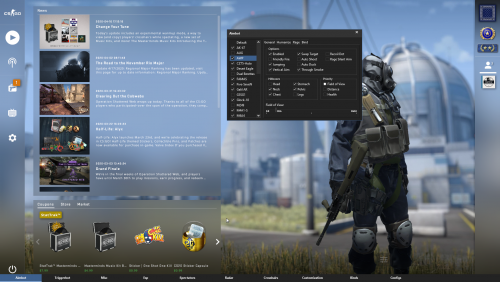 unstuck awp problem
 -
yeah. i have it zipped and everything but i dont have the "drag files here to attach or choose files" option like you do.
-
the awp settings just simply arent working at all period no matter how i set them
-
its usually set to about 2.1. the thing with the awp is that when i use to change the fov i could aim next to enemies and still hit them. so for instance if i flicked a shot across my screen and only hit next to them it would still hit them because of the awp settings on rh. how do i accomplish this agin?
-
https://ibb.co/Nr3rFsy
-
i cant even post a screenshot of it on here
-
i zipped the file but im still unable to send it apparently.. how else can i send it to you?
-
im not positive how to insert the file onto this forum chat? i cannot just drag it in. do you have en email i can send it to? or another way?
-
i have the awp checked and enabled. it seems like its actually the only gun having this issue
-
dosent field of view change the aspect of the awp being able to hit an inch or two too the side of the target?
-
Changing the field of view for the awp seems to not do anything at all. changing the other aspects is not working either. is something that im doing wrong?